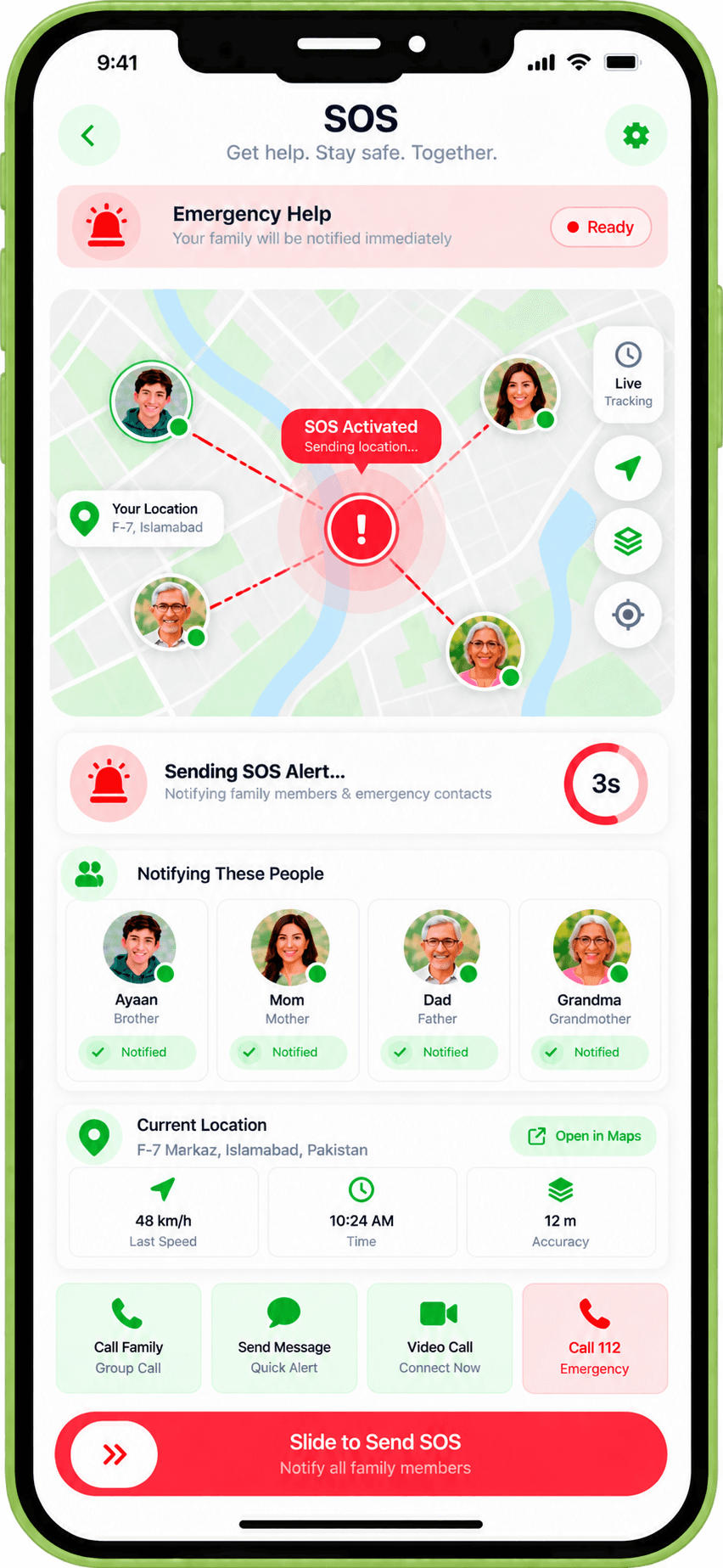
Reach the people you trust when every second matters.
Hold-and-confirm SOS alert sent to selected family members with your permitted location. Includes acknowledgement and responder coordination.
SOS
One-touch family SOS with hold-to-confirm.
Real family scenarios
A family member holds the SOS button to send an alert to selected relatives when in distress.
The family sees who has acknowledged the alert and who is responding.
An elderly grandparent uses SOS when they experience a fall at home.
Parents pre-configure SOS to alert both parents and a trusted neighbour simultaneously.
What's included
Hold-to-Confirm
SOS requires a deliberate hold action to prevent accidental triggers.
Selective Alert
Choose which family members receive each SOS alert.
Location Sharing
Permitted location is shared with alert recipients when SOS is triggered.
Acknowledgement
Alert recipients can confirm they are aware and respond through the app.
Responder Coordination
Responding family members can coordinate directly in the alert thread.
SOS alerts family members only. ADMA does not automatically contact emergency services. Always call your local emergency number in a real emergency.
Works alongside
Ready to try SOS?
Get early access and explore the full ADMA Family product.